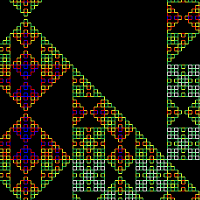
 Click the image on the left to launch the demo.
Added Google maps style scrolling, click & drag to move around.
Click the image on the left to launch the demo.
Added Google maps style scrolling, click & drag to move around.
Showing posts with label canvas. Show all posts
Showing posts with label canvas. Show all posts
Tuesday, October 11, 2011
LSystem 4
Click the image on the left to launch the demo.
Added Google maps style scrolling, click & drag to move around.

Thursday, August 26, 2010
Skies & Silhouettes
 Click the image on the left to start the demo. Update: There appears to be a bug that shows up in Chrome, where the sky is really blocky, but it works fine in FireFox.
I've got big plans for doing a project with heaps of skies and silhouettes (I'm kind of obsessed by them), and made this little program to quickly test out what different generated skies look like.
I had fun playing with it, hope you do too. Try out some examples, change the color values and click the button.
Update: (23/9/10) Added MaxAlpha setting, the actual alpha is a random number between 0 and this value, so the fact that you can set a number much higher than 255 is a feature not a bug.
Click the image on the left to start the demo. Update: There appears to be a bug that shows up in Chrome, where the sky is really blocky, but it works fine in FireFox.
I've got big plans for doing a project with heaps of skies and silhouettes (I'm kind of obsessed by them), and made this little program to quickly test out what different generated skies look like.
I had fun playing with it, hope you do too. Try out some examples, change the color values and click the button.
Update: (23/9/10) Added MaxAlpha setting, the actual alpha is a random number between 0 and this value, so the fact that you can set a number much higher than 255 is a feature not a bug.
Saturday, June 19, 2010
Flock in a cloudy blue sky
 Click on the image to load the canvas demo (requires FireFox or non-IE browser)
I took the existing Javascript boids implementation from Coderholic, and made it look pretty with swallows on a cloudy background.
The birds follow the standard 3 rules for Boids as first implemented by Craig Reynolds
Separation: steer to avoid crowding local flockmates
Alignment: steer towards the average heading of local flockmates
Cohesion: steer to move toward the average position of local flockmates
These simple rules for each individual leads to the group behavior - there is no central group intelligence or control. Flocking behaviors like this are often described as being emergent.
Update: (23/9/10) There is now an initial pause as the simulation runs 500 steps before displaying the boids. This removes the ugly initial craziness before they start flocking properly.
Click on the image to load the canvas demo (requires FireFox or non-IE browser)
I took the existing Javascript boids implementation from Coderholic, and made it look pretty with swallows on a cloudy background.
The birds follow the standard 3 rules for Boids as first implemented by Craig Reynolds
Separation: steer to avoid crowding local flockmates
Alignment: steer towards the average heading of local flockmates
Cohesion: steer to move toward the average position of local flockmates
These simple rules for each individual leads to the group behavior - there is no central group intelligence or control. Flocking behaviors like this are often described as being emergent.
Update: (23/9/10) There is now an initial pause as the simulation runs 500 steps before displaying the boids. This removes the ugly initial craziness before they start flocking properly.
Thursday, June 17, 2010
LSystem 3
Click on the image below to load the canvas demo (requires FireFox or non-IE browswer)

I added a zoom, and moved the Javascript into its own file. A tip is to zoom with a very low iteration, as otherwise it is very slow. I am going to look at rendering to a buffer and allowing scrolling.
I added a zoom, and moved the Javascript into its own file. A tip is to zoom with a very low iteration, as otherwise it is very slow. I am going to look at rendering to a buffer and allowing scrolling.
Monday, June 7, 2010
Falling Leaves
 Click on the image on the left to load the canvas demo (requires FireFox or non-IE browser). As with all of these demos, try clicking reload a few times to see different random versions.
Just an idea I had while riding my bike home, looking at fallen leaves (it's the start of winter here)
I changed the l-system renderer to use curves which I think makes the trees look more natural. I also used the canvas wrapper to be able to get the position of the leaves as they are generated so I can animate them.
Update: (23/9/10) Added hack to make leaves appear to collect on the ground beneath the trees.
Click on the image on the left to load the canvas demo (requires FireFox or non-IE browser). As with all of these demos, try clicking reload a few times to see different random versions.
Just an idea I had while riding my bike home, looking at fallen leaves (it's the start of winter here)
I changed the l-system renderer to use curves which I think makes the trees look more natural. I also used the canvas wrapper to be able to get the position of the leaves as they are generated so I can animate them.
Update: (23/9/10) Added hack to make leaves appear to collect on the ground beneath the trees.
Tuesday, May 18, 2010
Cloudy blue Perlin sky

Click on the image to load the canvas demo (requires FireFox or non-IE browser) Perlin Noise is a technique for generating procedural textures, commonly used for smoke, clouds or to add a random looking realistic roughness to surfaces. The algorithm is basically to generate noise, then scale that noise randomly across an image at different sizes and levels of transparency. This creates a self similarity which mimics the appearance of some natural processes. I found a canvas implementation by iron_wallaby and made the noise be the transparency of pure white, giving a cloud like effect. This was originally going to be just the background for another canvas demo I was working on, but that is delayed as I'm currently doing bioinformatics study/working on a project in my spare time. Things to improve on this are restricting how cloudy it is to a range, and removing some visual artifacts (lines/blockiness)
Tuesday, April 13, 2010
Russian Dolls - Random combinations
 Click on the image on the left to load the canvas demo (requires FireFox or non-IE browser)
This demo shows how a huge amount of content can be generated by randomly combining variations. This technique is useful as for example a crowd of identical people looks unnatural, but you don't necessarily care what the individuals look like, so long as they match a general theme.
The numbers get large very quickly - for instance 3 variations of hair color, and 2 of eye color gives 3 * 2 = 6 possible combinations (assuming independent assortment). Adding another trait multiplies this again, and soon the number of possible variations becomes enormous.
The code internals do not resemble genetics, but there is a similar idea in nature, with alleles. In the future I may use the dolls and their many variations as phenotypes for some experiments in this area.
The reason I chose to use Russian dolls (aside from just liking their recursive nature) is because my daughter Caitlin has lots of them on various clothes, bags, sheets etc, so this is for her.
It works fine in FireFox but there is something strange going on with parts of the faces not being drawn in some versions of Chrome.
Click on the image on the left to load the canvas demo (requires FireFox or non-IE browser)
This demo shows how a huge amount of content can be generated by randomly combining variations. This technique is useful as for example a crowd of identical people looks unnatural, but you don't necessarily care what the individuals look like, so long as they match a general theme.
The numbers get large very quickly - for instance 3 variations of hair color, and 2 of eye color gives 3 * 2 = 6 possible combinations (assuming independent assortment). Adding another trait multiplies this again, and soon the number of possible variations becomes enormous.
The code internals do not resemble genetics, but there is a similar idea in nature, with alleles. In the future I may use the dolls and their many variations as phenotypes for some experiments in this area.
The reason I chose to use Russian dolls (aside from just liking their recursive nature) is because my daughter Caitlin has lots of them on various clothes, bags, sheets etc, so this is for her.
It works fine in FireFox but there is something strange going on with parts of the faces not being drawn in some versions of Chrome.
Wednesday, March 17, 2010
Canvas Wrapper with getTransform()
The Canvas spec does not include a getTransform() method, so after performing rotation/scale/translation operations there is no way to work out where you really are.
So, I have created a wrapper class, which sits over the top of Canvas, and should behave exactly the same, except you now have a getTransform() method which returns a matrix such that the following doesn't do anything:
Update 10/2/2013: Thanks to Heikki Pora for a patch adding some missing features.
Update 19/5/2015: The HTML Spec now includes context.currentTransform but it doesn't work for me in Firefox or Chromium, ctx.mozCurrentTransform does work in Firefox.
So, I have created a wrapper class, which sits over the top of Canvas, and should behave exactly the same, except you now have a getTransform() method which returns a matrix such that the following doesn't do anything:
var m = ctx.getTransform();
ctx.setTransform( m[0][0], m[0][1], m[1][0], m[1][1], m[2][0], m[2][1] );
To use, add the following line:
<script type="text/javascript" src="canvas_wrapper.js"></script>then wrap your canvas object in a CanvasWrapper, ie:
ctx = new CanvasWrapper(document.getElementById("canvas").getContext("2d"));
It works by duplicating Canvas' matrix operations, and mimicking the Canvas interface. An annoyance is that Canvas has public fields, instead of accessor methods, so I can't tell when it has been changed and have to update the canvas state before any drawing call.Update 10/2/2013: Thanks to Heikki Pora for a patch adding some missing features.
Update 19/5/2015: The HTML Spec now includes context.currentTransform but it doesn't work for me in Firefox or Chromium, ctx.mozCurrentTransform does work in Firefox.
Tuesday, March 16, 2010
L-System v2

I have modified my previous L-System demo and added a few new features. Click on the image on the left to load the canvas demo. The axiom, rules and angle are now in editable fields, so you can change them and click [update] to view. This makes it quite quick to play around and explore l-systems. For the code internals, I separated out the l-system code into its own .js file, and also changed how the turtle works. Instead of a case statement, it now uses a map of functions, which looks like this:
return {
    // Turn right
    '+': function(args) { args.ctx.rotate(vary( args.angle, args.angle * args.angleVariance)); },
    // Turn left
    '-': function(args) { args.ctx.rotate(vary(-args.angle, args.angle * args.angleVariance)); },
    // Push
    '[': function(args) { args.ctx.save(); args.depth++; },
    // Pop
    ']': function(args) { args.ctx.restore(); args.depth--; },
    // Draw forward by length computed by recursion depth
    '|': function(args) { args.distance /= Math.pow(2.0, args.depth); drawForward() },
    'F': drawForward,
    'A': drawForward,
    'B': drawForward,
    'G': goForward
};
This makes it extremely easy to add new turtle commands, for instance to draw a green dot every time you see a 'L' just add the following to the map:
turtleHandler['L'] = function(args) {
args.ctx.fillStyle = '#00ff00';
args.ctx.beginPath();
args.ctx.arc(0, 0, 2, 0, 2 * Math.PI, true);
args.ctx.fill();
}
This was used to draw the leaves in the image above. To get 'L's in the right place in the l-system, I used 'L->' as the first rule, which deletes all existing 'L's, so the only ones that remain at the end of the iterations are the most recently created ones, which are on the (appropriately named) leaf nodes.
TODO: Make extra functions an editable field, make better alignment/zooming.Thursday, January 14, 2010
City Skyline and random seeds
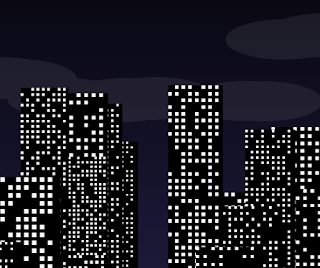 Click the image on the left to view the canvas demo. (you need a browser other than Internet Explorer)
This generates a random city skyline, which fades from sunset to night time.
A way to achieve the effect would have been to generate the buildings, store them and alter their state as we go, but I did it a different way to demonstrate a property of generating scenes with pseudo random numbers.
Computers are deterministic so the random numbers are not really random. There are algorithms which can produce a random looking number from another number, and so by using one number to create the next, you can create a random looking sequence. The first number you start with is called a (random) seed.
A generator will usually set a seed if you don't specify it, using something kind of random it can get, eg the current time, the id of the process or the temperature of the CPU. Not setting the seed is thus the normal thing to do, as each run of the program will probably be different and things will appear more random.
However, by setting the seed you can generate a repeated sequence of numbers. This means that if you have some data that is created by a sequence of random numbers, by setting the seed to the same value, you can re-create it again. This is an incredible CPU/memory trade off, where you can generate infinite complexity with CPU time for a single integer value in the seed! A game in the 1980s called Elite used this technique to generate a huge game world on the tiny computers of the time.
The way the demo works is to reset the random seed each frame and then generate everything again using repeated calls to random. The windows have a random value of what time they'll turn on, and if it's past that time, they will be on.
This demonstrates how you can change some things in the the repeated calls, but critically the calls to random must be the same sequence, ie don't put calls to random in branches that depend on something that varies each call.
Click the image on the left to view the canvas demo. (you need a browser other than Internet Explorer)
This generates a random city skyline, which fades from sunset to night time.
A way to achieve the effect would have been to generate the buildings, store them and alter their state as we go, but I did it a different way to demonstrate a property of generating scenes with pseudo random numbers.
Computers are deterministic so the random numbers are not really random. There are algorithms which can produce a random looking number from another number, and so by using one number to create the next, you can create a random looking sequence. The first number you start with is called a (random) seed.
A generator will usually set a seed if you don't specify it, using something kind of random it can get, eg the current time, the id of the process or the temperature of the CPU. Not setting the seed is thus the normal thing to do, as each run of the program will probably be different and things will appear more random.
However, by setting the seed you can generate a repeated sequence of numbers. This means that if you have some data that is created by a sequence of random numbers, by setting the seed to the same value, you can re-create it again. This is an incredible CPU/memory trade off, where you can generate infinite complexity with CPU time for a single integer value in the seed! A game in the 1980s called Elite used this technique to generate a huge game world on the tiny computers of the time.
The way the demo works is to reset the random seed each frame and then generate everything again using repeated calls to random. The windows have a random value of what time they'll turn on, and if it's past that time, they will be on.
This demonstrates how you can change some things in the the repeated calls, but critically the calls to random must be the same sequence, ie don't put calls to random in branches that depend on something that varies each call.
Sunday, December 13, 2009
Diffusion limited aggregation
 Click the image on the left to view the canvas demo.
This is an example of diffusion limited aggregation - a natural process where randomly moving particles stick together, to form clusters. A good example is crystals.
An initial seed is fixed in place, then particles are randomly moved around until they hit part of the main cluster, where they stick. This leads to a bigger cluster and feeds back on itself, producing a stochastic fractal (Stochastic means a random process)
Code comments:
I wrote this after looking at the C code for "diffuse.c" from The Computational Beauty of Nature (see books). An optimisation I copied from there is to constrain the particles to within 10 pixels either side of the cluster, to stop particles wandering off where they would never hit anything. This shouldn't have too much effect on the resulting graphics but is much faster (especially at the start)
Click the image on the left to view the canvas demo.
This is an example of diffusion limited aggregation - a natural process where randomly moving particles stick together, to form clusters. A good example is crystals.
An initial seed is fixed in place, then particles are randomly moved around until they hit part of the main cluster, where they stick. This leads to a bigger cluster and feeds back on itself, producing a stochastic fractal (Stochastic means a random process)
Code comments:
I wrote this after looking at the C code for "diffuse.c" from The Computational Beauty of Nature (see books). An optimisation I copied from there is to constrain the particles to within 10 pixels either side of the cluster, to stop particles wandering off where they would never hit anything. This shouldn't have too much effect on the resulting graphics but is much faster (especially at the start) Tuesday, December 8, 2009
Animation demo

Click the image on the left to view the demo. (requires FireFox/Chrome) View Source code.
Note (2022): This no longer works I think it's
The TV should show an image off the web, mixed with random static. You can change the image to something supported by your browser. Andrew M found out animated .gifs work, for instance copy "http://www.moonbattery.com/BashKeyboard.gif" to the URL at the bottom.
 If you right click on a canvas element, you can get an URL for the current image. I then used that as the input for another tv, to get the recursive picture going on the right.
This was made for me to further learn HTML5 canvas, including animation (using callbacks in .js), CanvasPixelArray, masking and using images.
If you right click on a canvas element, you can get an URL for the current image. I then used that as the input for another tv, to get the recursive picture going on the right.
This was made for me to further learn HTML5 canvas, including animation (using callbacks in .js), CanvasPixelArray, masking and using images.
Tuesday, November 24, 2009
L-System
 An L-System in javascript & canvas. You can use a drop-down box to alter which fractal is drawn and how many iterations to perform.
An L-System is a way of describing self-similar fractals, like plants - it works by changing symbols according to rules and performing multiple iterations.
To display, the final string is interpreted by a turtle which uses them as instructions (eg go forward, turn left, etc)
The wikipedia article is worth a look, it is where I got the axioms & rules from.
Warning: If you alter the values and set them to high it may freeze your browser
UPDATE: L-System version 2
An L-System in javascript & canvas. You can use a drop-down box to alter which fractal is drawn and how many iterations to perform.
An L-System is a way of describing self-similar fractals, like plants - it works by changing symbols according to rules and performing multiple iterations.
To display, the final string is interpreted by a turtle which uses them as instructions (eg go forward, turn left, etc)
The wikipedia article is worth a look, it is where I got the axioms & rules from.
Warning: If you alter the values and set them to high it may freeze your browser
UPDATE: L-System version 2
Monday, November 23, 2009
Forest Night

The idea is you're lying on your back in a forest, looking at stars. Click the image on the left to view the demo. Press reload to view a different version. Written in Javascript / HTML Canvas (use Firefox, or anything other than Internet Explorer)
Field of flowers

A field of flowers Click the image on the left to view the demo. Written in Javascript / HTML Canvas (use Firefox, or anything other than Internet Explorer)
Subscribe to:
Posts (Atom)