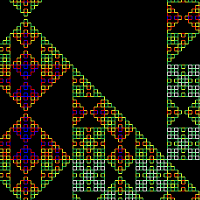
 Click the image on the left to launch the demo.
Added Google maps style scrolling, click & drag to move around.
Click the image on the left to launch the demo.
Added Google maps style scrolling, click & drag to move around.
Showing posts with label l-system. Show all posts
Showing posts with label l-system. Show all posts
Tuesday, October 11, 2011
LSystem 4
Click the image on the left to launch the demo.
Added Google maps style scrolling, click & drag to move around.

Thursday, June 17, 2010
LSystem 3
Click on the image below to load the canvas demo (requires FireFox or non-IE browswer)

I added a zoom, and moved the Javascript into its own file. A tip is to zoom with a very low iteration, as otherwise it is very slow. I am going to look at rendering to a buffer and allowing scrolling.
I added a zoom, and moved the Javascript into its own file. A tip is to zoom with a very low iteration, as otherwise it is very slow. I am going to look at rendering to a buffer and allowing scrolling.
Monday, June 7, 2010
Falling Leaves
 Click on the image on the left to load the canvas demo (requires FireFox or non-IE browser). As with all of these demos, try clicking reload a few times to see different random versions.
Just an idea I had while riding my bike home, looking at fallen leaves (it's the start of winter here)
I changed the l-system renderer to use curves which I think makes the trees look more natural. I also used the canvas wrapper to be able to get the position of the leaves as they are generated so I can animate them.
Update: (23/9/10) Added hack to make leaves appear to collect on the ground beneath the trees.
Click on the image on the left to load the canvas demo (requires FireFox or non-IE browser). As with all of these demos, try clicking reload a few times to see different random versions.
Just an idea I had while riding my bike home, looking at fallen leaves (it's the start of winter here)
I changed the l-system renderer to use curves which I think makes the trees look more natural. I also used the canvas wrapper to be able to get the position of the leaves as they are generated so I can animate them.
Update: (23/9/10) Added hack to make leaves appear to collect on the ground beneath the trees.
Tuesday, March 16, 2010
L-System v2

I have modified my previous L-System demo and added a few new features. Click on the image on the left to load the canvas demo. The axiom, rules and angle are now in editable fields, so you can change them and click [update] to view. This makes it quite quick to play around and explore l-systems. For the code internals, I separated out the l-system code into its own .js file, and also changed how the turtle works. Instead of a case statement, it now uses a map of functions, which looks like this:
return {
    // Turn right
    '+': function(args) { args.ctx.rotate(vary( args.angle, args.angle * args.angleVariance)); },
    // Turn left
    '-': function(args) { args.ctx.rotate(vary(-args.angle, args.angle * args.angleVariance)); },
    // Push
    '[': function(args) { args.ctx.save(); args.depth++; },
    // Pop
    ']': function(args) { args.ctx.restore(); args.depth--; },
    // Draw forward by length computed by recursion depth
    '|': function(args) { args.distance /= Math.pow(2.0, args.depth); drawForward() },
    'F': drawForward,
    'A': drawForward,
    'B': drawForward,
    'G': goForward
};
This makes it extremely easy to add new turtle commands, for instance to draw a green dot every time you see a 'L' just add the following to the map:
turtleHandler['L'] = function(args) {
args.ctx.fillStyle = '#00ff00';
args.ctx.beginPath();
args.ctx.arc(0, 0, 2, 0, 2 * Math.PI, true);
args.ctx.fill();
}
This was used to draw the leaves in the image above. To get 'L's in the right place in the l-system, I used 'L->' as the first rule, which deletes all existing 'L's, so the only ones that remain at the end of the iterations are the most recently created ones, which are on the (appropriately named) leaf nodes.
TODO: Make extra functions an editable field, make better alignment/zooming.Tuesday, November 24, 2009
L-System
 An L-System in javascript & canvas. You can use a drop-down box to alter which fractal is drawn and how many iterations to perform.
An L-System is a way of describing self-similar fractals, like plants - it works by changing symbols according to rules and performing multiple iterations.
To display, the final string is interpreted by a turtle which uses them as instructions (eg go forward, turn left, etc)
The wikipedia article is worth a look, it is where I got the axioms & rules from.
Warning: If you alter the values and set them to high it may freeze your browser
UPDATE: L-System version 2
An L-System in javascript & canvas. You can use a drop-down box to alter which fractal is drawn and how many iterations to perform.
An L-System is a way of describing self-similar fractals, like plants - it works by changing symbols according to rules and performing multiple iterations.
To display, the final string is interpreted by a turtle which uses them as instructions (eg go forward, turn left, etc)
The wikipedia article is worth a look, it is where I got the axioms & rules from.
Warning: If you alter the values and set them to high it may freeze your browser
UPDATE: L-System version 2
Subscribe to:
Posts (Atom)